
What Is an eSIM? (2026 Complete Guide)
eSIM is transforming how we connect to mobile networks. In this 2026 guide, discover how eSIM works, how to install it, its key benefits for travelers, and why it’s quickly replacing traditional SIM cards around the world.
Soovia Team
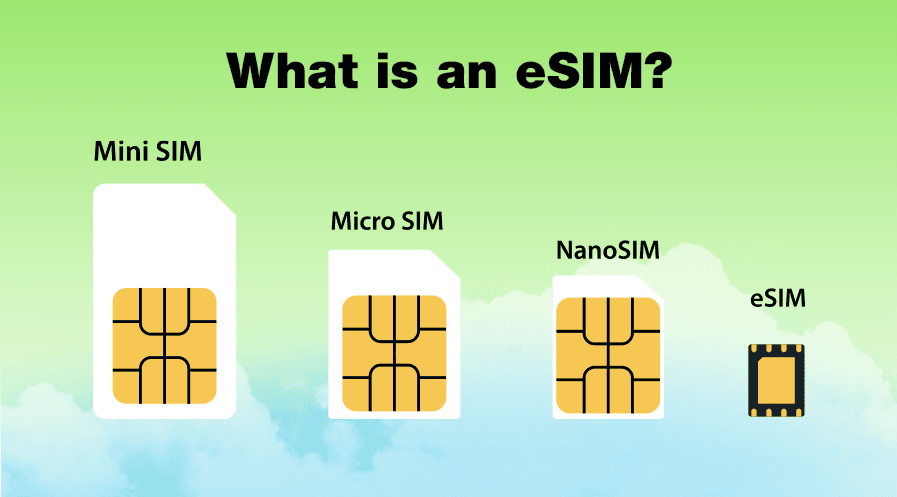
An eSIM, or embedded SIM, is a digital SIM built into a phone, tablet, smartwatch, laptop, or connected device. It does the same basic job as a physical SIM card, but you do not need to insert a plastic card into your device. Instead, you install a mobile plan digitally and manage it from your device settings.
For travelers, this makes mobile data much easier to arrange before a trip. You can buy an eSIM plan online, install it with a QR code or activation link, keep your main number active, and connect to supported local networks when you arrive.
Quick Answer: An eSIM is a digital version of a SIM card. It lets you activate a mobile data plan without using a physical SIM card. Most people use eSIM for travel data, dual SIM setups, quick carrier switching, and connected devices.
- Install a mobile data plan directly on a compatible device.
- Use a QR code, activation link, or manual setup details instead of a plastic SIM card.
- Connect to supported local mobile networks when traveling abroad.
- Keep your main number active while using eSIM for mobile data.
Before buying an eSIM, check your device on our compatible phones list. If your phone supports eSIM and is unlocked, setup usually takes only a few minutes.
How Does an eSIM Work?
An eSIM works by storing your mobile subscription digitally on a secure chip inside your device. This chip is called an eUICC. Instead of using a removable plastic SIM card, your phone downloads and installs a digital eSIM profile over the internet.
In simple terms, the process usually works like this:
- You buy an eSIM plan: Choose a mobile data plan for your destination, region, or device.
- You receive activation details: Your provider sends a QR code, activation link, or manual setup information.
- Your phone contacts the provider: When you scan the QR code or tap the link, your device connects to the provider’s secure system.
- The eSIM profile is downloaded: The mobile network profile assigned to your plan is installed on the secure eSIM chip inside your device.
- You select the eSIM for mobile data: After installation, you can choose the eSIM in your cellular or mobile data settings.
- Your device connects to the network: Once the plan is active and the right settings are enabled, your phone connects to the supported mobile network.
What happens when you scan an eSIM QR code?
When you scan an eSIM QR code, your phone does more than open a link. It uses the activation details to download the correct mobile network profile and add it to your device securely.
- You do not need to open the SIM tray.
- You do not need to wait for a physical SIM card.
- You do not need to remove your main SIM.
- You can prepare your travel data before leaving home.
For travelers, this is one of the biggest advantages of eSIM. You can install your plan while connected to Wi-Fi and use mobile data more easily after you arrive.
Remote SIM Provisioning in simple terms
eSIM uses a secure system called Remote SIM Provisioning, also known as RSP. This is the technology that allows eSIM plans to be prepared, delivered, installed, and managed digitally.
- Device or eUICC: The secure chip inside your device that stores one or more eSIM profiles.
- SM-DP+: The secure platform that prepares and delivers carrier profiles to compatible devices.
- SM-DS: A discovery system that helps compatible devices find available eSIM profiles when supported.
For the user, the experience is simple: scan a QR code, follow the on-screen steps, and choose the eSIM for mobile data. The security checks and profile delivery happen in the background.
Further reading: GSMA eSIM Overview • GSMA How eSIM Works
eSIM vs Physical SIM: Key Differences
eSIM and physical SIM cards both help your device connect to a mobile network. The difference is how you install, manage, and switch mobile plans. A physical SIM depends on a removable card. An eSIM lets you add and manage mobile plans digitally.
| Feature | Physical SIM | eSIM |
|---|---|---|
| Form Factor | A removable plastic card | A digital SIM profile stored on a secure chip inside the device |
| Activation | You insert the SIM card into the SIM tray | You install the plan digitally using a QR code, link, or manual details |
| Carrier or Plan Switching | You usually need a new SIM card | You can add or switch profiles from device settings when supported |
| Multiple Profiles | Limited by the number of SIM slots | Many devices can store multiple eSIM profiles |
| Physical Risk | Can be lost, damaged, stolen, or misplaced | Built into the device, so there is no small card to remove or lose |
| Travel Use | You may need to buy a local SIM card after arrival | You can install a travel data plan before your trip |
| Device Design | Requires a SIM tray or card slot | Helps reduce reliance on physical SIM hardware |
| Water and Dust Resistance | The SIM tray can be another opening in the device | Supports more sealed device designs |
| User Experience | Often involves swapping cards, keeping a SIM tool, or visiting a shop | Installed and managed from the phone’s settings |
Is eSIM better than a physical SIM?
eSIM is usually better if you travel often, use more than one mobile plan, want to keep your main number active, or prefer setting up mobile data online. A physical SIM still works well if you use one carrier in one country and rarely change plans.
For most travelers, the benefit is practical rather than technical. You can avoid airport SIM shops, reduce the need for card swapping, and choose a data plan before your trip starts.
Why Travelers Prefer eSIM for Mobile Data Abroad
Travel is one of the clearest reasons to use an eSIM. When you land in a new country, you usually need mobile data for maps, ride apps, hotel check-ins, train tickets, translation, messaging, and travel documents. eSIM helps you set that up before you arrive.
Instead of searching for a SIM card shop after a long flight, you can buy a travel eSIM online, install it over Wi-Fi, and connect to a supported local network when the plan becomes active.
- You can prepare before the trip: Install the eSIM at home, at your hotel, or anywhere with stable Wi-Fi.
- You can keep your main number active: Use your regular SIM for calls, SMS, and verification codes while using eSIM for data.
- You can avoid physical SIM card problems: No SIM tray tool, no tiny card to lose, and no need to swap cards during the trip.
- You can choose a plan that fits the trip: Pick a country, regional, or global data plan depending on where you are going.
- You can reduce roaming surprises: A prepaid travel eSIM gives you a clearer idea of how much mobile data will cost.
Reference: Thales: 6 Key Points to Understand What an eSIM Is
How to Set Up an eSIM Step by Step
Setting up an eSIM is usually simple, but the exact menu names can be different on iPhone, Samsung, Google Pixel, and other Android phones. The general process is the same on most devices.
- Choose a plan: Buy an eSIM plan for your destination, region, or travel period.
- Receive the activation details: Your provider sends a QR code, activation link, or manual setup information.
- Connect to Wi-Fi: Use a stable internet connection before starting the installation.
- Install the eSIM profile: Scan the QR code or tap the activation link to add the eSIM to your device.
- Select the eSIM for mobile data: Open cellular or mobile data settings and choose the new eSIM as your data line.
- Turn on data roaming if required: Many travel eSIM plans need data roaming enabled to connect abroad.
- Restart or refresh the connection: If the network does not connect right away, restart the phone or toggle Airplane Mode.
Before you install an eSIM
- Make sure your phone supports eSIM.
- Check that your device is unlocked and not restricted to one carrier.
- Install the eSIM while connected to a stable Wi-Fi network.
- Do not delete the eSIM profile unless you are sure you no longer need it.
- Keep the QR code, activation email, or manual setup details until the trip is over.
Device guides: Apple: Set up eSIM on iPhone • Apple: Using Dual SIM with an eSIM • Google: Set up a new eSIM on Pixel
For more detailed setup instructions, you can also read the Soovia Help Center guides for installing eSIM on iPhone and installing eSIM on Android.
Security and Privacy Benefits
eSIM is convenient, but it can also reduce some of the risks linked to physical SIM cards. Because there is no removable card, someone cannot simply take the SIM out of your phone and place it in another device.
- Harder to physically remove: The eSIM profile is stored inside the device, not on a plastic card.
- Secure digital provisioning: eSIM profiles are delivered through protected digital systems.
- Less physical handling: You do not need to carry, swap, or store small SIM cards while traveling.
- Better for managed devices: Businesses can manage mobile connectivity across phones, tablets, laptops, vehicles, and IoT devices more efficiently.
- Useful if a device is lost: Depending on the provider and device, eSIM profiles may be easier to manage remotely than physical SIM cards.
eSIM does not remove the need for basic account security. You should still protect your email account, use strong passwords, avoid suspicious links, and enable two-factor authentication where possible.
Further reading: GSMA: Security Analysis of the Consumer RSP Protocol • GSMA: eUICC Security Assurance
Troubleshooting: Common eSIM Issues and Fixes
Most eSIM installations work smoothly, but a few small settings can stop mobile data from connecting. The most common causes are the wrong mobile data line, data roaming being turned off, weak signal, incorrect APN settings, a locked phone, or an incomplete installation.
Quick Fix: If your eSIM is installed but the internet is not working, first make sure the eSIM is selected for mobile data, Data Roaming is turned on, and the phone has been restarted after installation.
For a full checklist, read our guide: eSIM not working? Here is how to fix it.
- No Service after installation: Select the eSIM as your mobile data line. If you are abroad, turn on Data Roaming, toggle Airplane Mode, and try again.
- Stuck on Activating: Use a stable Wi-Fi connection, restart your device, and check whether the eSIM profile was fully installed.
- Mobile data does not work: Make sure mobile data is assigned to the eSIM, not your primary SIM. Also check whether the plan is valid for your current country.
- Wrong APN settings: Some plans need a specific APN. If your provider gives APN details, enter them manually in cellular data settings.
- Dual SIM confusion: If your main SIM and eSIM are both active, check which line is set for mobile data, calls, and SMS.
- Phone locked to another carrier: A carrier-locked phone may reject travel eSIM plans. Check the lock status before purchasing an eSIM.
- Usage shows 0 even though data works: Some usage dashboards update with a delay. If the internet is working, the dashboard may simply need more time to refresh.
Best Practices for Travel with eSIM
A few simple habits can make your travel eSIM experience much smoother, especially if you are visiting more than one country or relying on mobile data for maps, bookings, and messaging.
- Install before you travel: Add the eSIM while you still have reliable Wi-Fi. This is easier than trying to install it in a busy airport.
- Label your plans clearly: Use names such as Home, Europe Trip, Japan Data, or Italy eSIM so you know which line is active.
- Check compatibility first: Make sure your exact phone model supports eSIM before buying a plan.
- Keep your main SIM active if needed: This helps you receive calls, SMS, and banking verification codes while using eSIM for data.
- Allow LTE fallback: 5G can be fast, but LTE may be more stable in some destinations or rural areas.
- Save the activation details: Keep your QR code or setup email until the eSIM is installed and working.
- Do not delete the eSIM too early: Some travel eSIMs can only be installed once. Delete it only when you are sure the trip is over or the plan is no longer needed.
Compatible Devices and the eSIM-Only Trend in 2026
In 2026, eSIM support is common on many modern smartphones and is also growing across tablets, smartwatches, laptops, vehicles, and IoT devices. Some phone models in certain regions are already sold without a physical SIM tray, which shows how quickly the industry is moving toward digital SIM technology.
- Phones: Many recent iPhone, Google Pixel, Samsung Galaxy, and other Android models support eSIM.
- Wearables: Cellular smartwatches often use eSIM so they can connect without fully depending on a phone.
- Tablets and laptops: Always-connected devices can use eSIM for mobile data when Wi-Fi is not available.
- Vehicles and IoT devices: Connected cars, industrial devices, trackers, and smart systems use eSIM for easier remote connectivity management.
Before buying a travel eSIM or switching mobile plans, confirm two things. Your device must support eSIM, and your chosen provider must offer coverage for your destination.
FAQs
What is an eSIM?
An eSIM is a digital SIM built into a compatible device. It lets you install and use a mobile plan without inserting a physical SIM card.
Can I use an eSIM and a physical SIM at the same time?
On many devices, yes. You can keep your main number on a physical SIM and use an eSIM for mobile data. Some newer phones also support two active eSIMs at the same time, but this depends on the device model.
Is eSIM good for international travel?
Yes. eSIM is especially useful for international travel because you can buy and install a data plan before arrival, avoid physical SIM card shops, and connect to supported local networks when you land.
Is eSIM more secure than a regular SIM?
eSIM can reduce some risks linked to removable SIM cards because there is no physical card to lose, remove, or swap. It also uses secure digital provisioning. However, your account security still matters, so strong passwords and two-factor authentication are still important.
Can I move my eSIM to a new phone?
Sometimes, yes. Some carriers and devices support eSIM transfer or re-download. Many travel eSIMs are designed for one-time installation, so you should always check the provider’s terms before deleting or moving an eSIM profile.
Do I need internet to activate an eSIM?
Yes. Your device needs an internet connection, usually Wi-Fi, to download and install the eSIM profile. After installation, the eSIM uses the mobile network included in your plan.
Will eSIM affect my battery life?
In normal use, eSIM itself should not noticeably reduce battery life. Signal strength, weak coverage, 5G usage, background apps, and having two active lines usually affect battery more than whether your plan uses eSIM or a physical SIM.
What happens if I delete an eSIM profile?
If you delete an eSIM profile, you may need to download it again from your provider if reinstallation is supported. Some providers restrict multiple downloads, so do not delete an eSIM unless you are sure you no longer need it.
Can I use eSIM for calls and SMS?
It depends on the plan. Many travel eSIM plans are data-only, which means they provide mobile internet but not a local phone number for calls or SMS. You can usually keep your main SIM active for calls, texts, and verification codes while using eSIM for mobile data.
Does eSIM work without a physical SIM card?
Yes. If your device supports eSIM and your provider supports your destination, an eSIM can work without a physical SIM card. Some newer devices in certain regions are even sold as eSIM-only models.
Myths and Misconceptions
- “eSIM locks me to one carrier.” Not necessarily. Many devices can store more than one eSIM profile, and you can switch between supported plans from settings.
- “I cannot use my main number with eSIM.” In many cases, you can keep your main number active while using a separate eSIM for mobile data.
- “eSIM is only for expensive phones.” eSIM started on higher-end devices, but support has expanded across many modern phones, tablets, wearables, and laptops.
- “eSIM is always less secure.” Not true. eSIM uses secure hardware and digital provisioning, and it removes the risk of losing a small physical SIM card.
- “eSIM always activates instantly.” Not always. Some plans activate immediately after installation, while others activate only when they connect to a supported network in the destination.
Glossary: Quick Reference
- eSIM: A digital SIM that lets you install a mobile plan without using a removable SIM card.
- Embedded SIM: The full meaning of eSIM. It refers to SIM technology built into the device.
- eUICC: The secure chip inside your device that stores eSIM profiles.
- Profile: The digital subscription package that allows your device to connect to a mobile network.
- SM-DP+: The secure platform that prepares and delivers eSIM profiles.
- SM-DS: A discovery system that helps compatible devices find available eSIM profiles.
- RSP: Remote SIM Provisioning, the framework that enables digital eSIM installation and management.
- OTA: Over-the-air provisioning, which means the eSIM profile is delivered digitally to your device.
- Data Roaming: A setting that allows your device to use mobile data on a partner network outside your main carrier’s home network.
- APN: Access Point Name. Some mobile data plans need a specific APN setting to connect properly.
The Future of eSIM and iSIM
eSIM is part of a wider move toward smaller, more flexible, and more connected devices. The next step is iSIM, where SIM functionality is integrated into the device’s main chipset instead of using a separate embedded SIM component.
For everyday users, the direction is simple: mobile plans are becoming easier to install, easier to manage, and less dependent on plastic SIM cards. For businesses and device makers, digital SIM technology also makes it easier to manage large numbers of connected devices across different countries and networks.
As smartphones, wearables, connected vehicles, tablets, laptops, and IoT systems continue to grow, eSIM and iSIM will become a more normal part of how devices connect to mobile networks.
Final Thoughts
eSIM makes mobile connectivity easier by removing the need for a physical SIM card. You can install a plan digitally, manage it from your device settings, and use mobile data more easily when traveling abroad.
For most travelers, the main benefit is convenience. You can prepare your mobile data before your trip, keep your main number active, and connect to supported local networks without looking for a SIM card shop after arrival.
Many providers now offer eSIM plans, including Soovia. Before choosing a plan, make sure your device supports eSIM, check that it is unlocked, and choose coverage that matches your destination.