
Best eSIM for USA in 2026 (5 Options Compared)
Finding the best USA eSIM in 2026 comes down to one question most guides skip: which carrier does it connect to? Land in New York or LA and every plan here delivers fast 5G. Drive three hours into Montana, head into Yellowstone, or take a highway through rural Nevada and the wrong eSIM leaves you offline for hours.
Soovia Team
The USA runs on three major networks: AT&T, T-Mobile, and Verizon. In cities they all perform well. Outside cities the gap between them is significant, and which one your eSIM connects to decides whether you have signal on a road trip or not.
For most USA trips, Soovia, Airalo, and Saily are the three tourist eSIM options worth looking at first. Soovia is the only fixed-data option here connecting to both AT&T and Verizon. Airalo is the most established platform with the widest plan range. Saily adds built-in security that runs automatically on every connection. Maya Mobile and aloSIM cover specific scenarios explained below.
Best eSIM for USA in 2026: 5 Providers for Cities and the Open Road
Quick picks by travel type:
- Soovia: Dual AT&T and Verizon access at the most competitive price
- Airalo: Widest fixed-data plan range with a trusted platform
- Saily: Built-in security features for public Wi-Fi and city travel
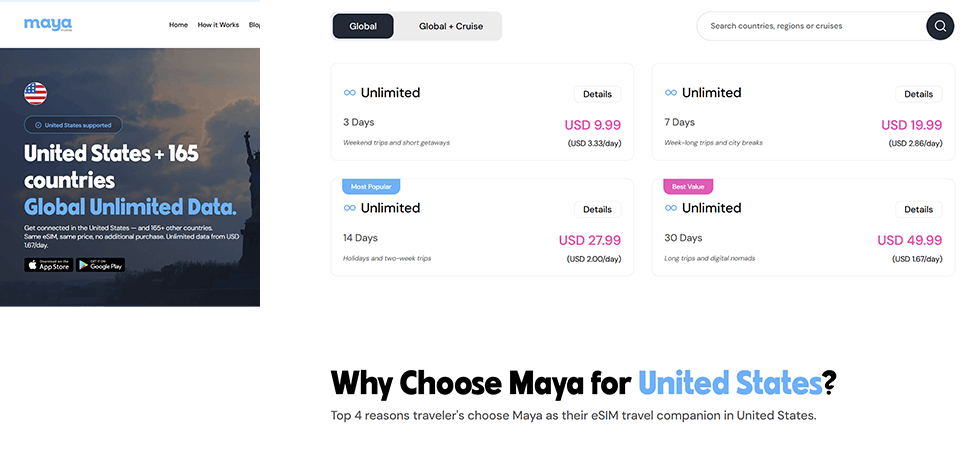
- Maya Mobile: One global eSIM if the USA is part of a longer trip
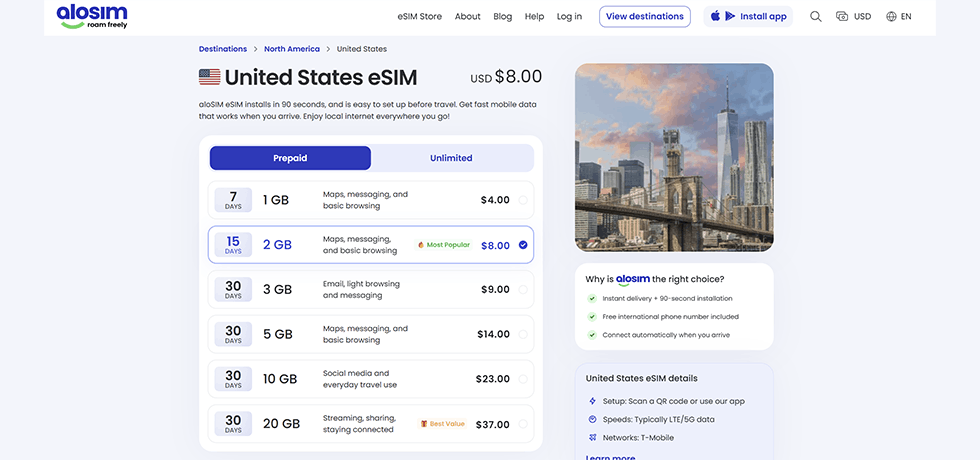
- aloSIM: Fixed-data plans with a Hushed number included
| eSIM Provider | Fixed Plans (5GB / 30 Days) | Unlimited Plan Transparency | Primary Network(s) | Starting Price | Hotspot |
|---|---|---|---|---|---|
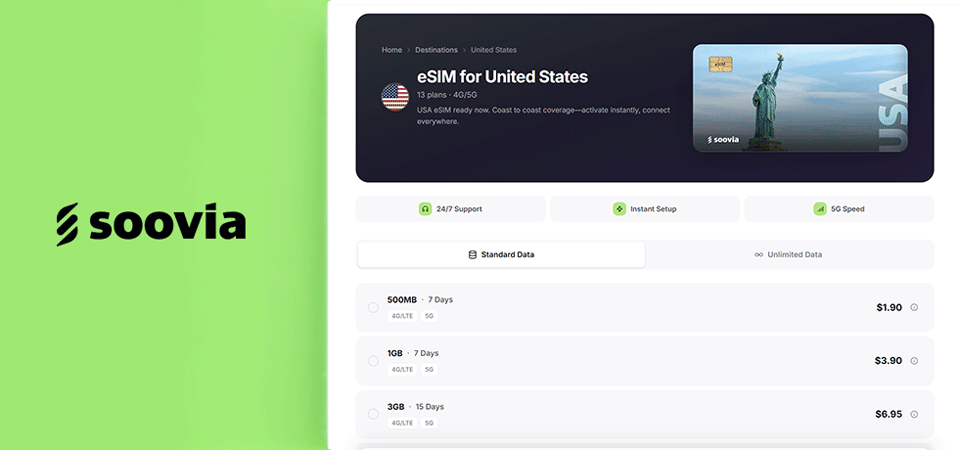
| Soovia | $9.80 | From $3.52/day; check FUP before buying | AT&T + Verizon | $1.90 / 500MB | Yes |
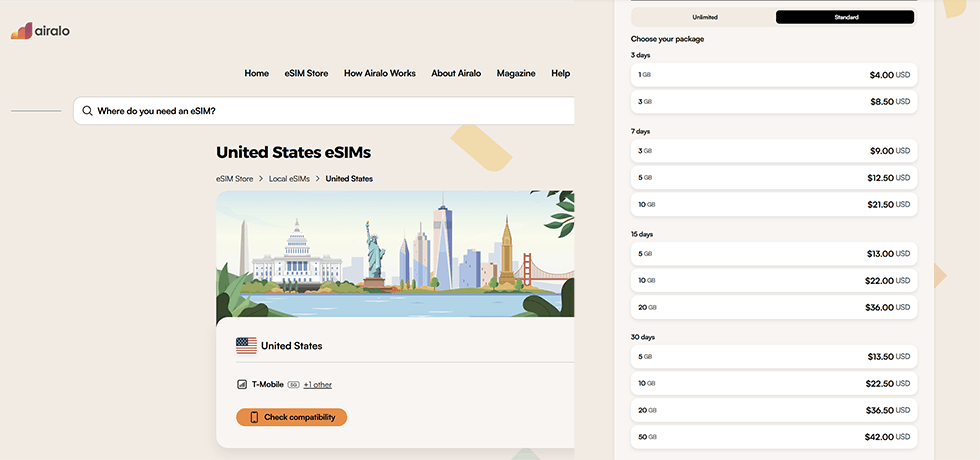
| Airalo | $13.50 | From $11.50/3 days; check FUP before buying | T-Mobile + Verizon | $4.00 / 1GB | Yes |
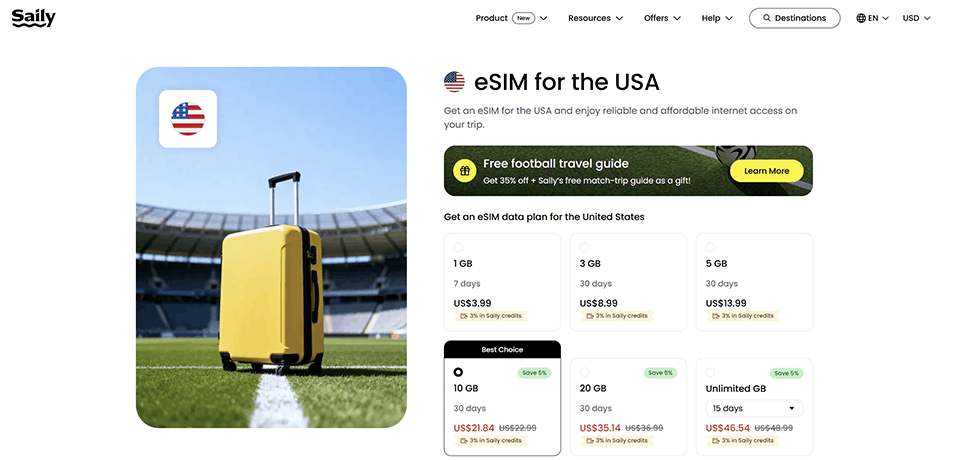
| Saily | $13.99 | 3GB/day cap then speed drops; check FUP | Local networks | $3.99 / 1GB | Yes |
| Maya Mobile | Unlimited only | Global unlimited; check FUP before buying | T-Mobile + Verizon | $9.99 / 3 days | Yes |
| aloSIM | $14.00 | From $11.50/3 days; check FUP before buying | T-Mobile | $4.00 / 1GB | Yes |
Prices verified July 5, 2026. Always confirm on the provider's site before purchasing as plans and pricing can change.
AT&T, T-Mobile, Verizon: Which Network Is Actually Fastest in the USA Right Now?
T-Mobile leads on speed, and it is not close. OpenSignal's 2026 US Mobile Network Experience report puts T-Mobile's everyday download speed at 184.7 Mbps, versus AT&T at 74.9 Mbps and Verizon at 73.8 Mbps. In cities and suburbs, T-Mobile delivers the fastest experience by a significant margin.
But speed rankings are only half the story. Verizon still covers more of rural America than any other carrier. National parks, small towns, mountain highways, long stretches of interstate through Montana or Wyoming: Verizon's infrastructure reaches places T-Mobile does not. AT&T sits between the two in both speed and rural reach.
What this means for choosing a USA eSIM: if your trip stays in cities, T-Mobile-connected plans are fast and reliable. If you are driving between states or heading into remote areas, Verizon access matters. Soovia is the only fixed-data provider in this list connecting to both AT&T and Verizon. Maya Mobile also connects to both T-Mobile and Verizon on its global plan.
Best USA eSIM in 2026: 5 Providers Reviewed
1. Soovia: Dual AT&T and Verizon Access at the Most Competitive Price
2. Airalo: Widest Fixed-Data Plan Range With a Trusted Platform
3. Saily: Built-In Security for Anyone Connecting to Public Wi-Fi
4. Maya Mobile: One eSIM for the USA and Every Other Country on Your Trip
5. aloSIM: Fixed-Data Plans With a Phone Number Included
How Much Data Will You Actually Use in the USA?
The USA's distances are the main variable. Google Maps running on a highway drive can burn 300 to 500MB per day before you have touched social media. A weekend in New York uses data very differently from a two-week road trip through the Southwest.
- City visit (New York, LA, Chicago, Miami): 2GB to 3GB per week covers navigation, messaging, and casual social media if you use hotel Wi-Fi in the evenings
- Coastal or interstate road trip: 5GB to 7GB per week, especially with navigation running for long stretches
- National park road trip: 7GB to 10GB per week; signal is intermittent so offline map downloads matter more than data volume
- Remote work from the USA: Go unlimited. HD video calls use 1GB to 2GB per hour and back-to-back meetings add up fast
- Stay over a month: A local prepaid SIM from T-Mobile, AT&T, or Verizon costs significantly less than any travel eSIM at that duration
Download offline maps before leaving your accommodation. In national parks especially, signal disappears for hours. Google Maps and Maps.me both support offline mode. On a serious road trip this is not a nice-to-have, it is essential. If you are unsure whether to go fixed or unlimited, this breaks down when each one actually makes sense.
Where Does Signal Actually Drop in the USA?
Most international visitors are surprised by how patchy US coverage gets outside metropolitan areas. The country is enormous and mobile infrastructure has real gaps.
- National parks: Yellowstone, Grand Canyon, Zion, Great Smoky Mountains: coverage exists at visitor centres but disappears quickly on trails. Download your maps before you enter the park gates, not at the trailhead.
- Rural highways: Long stretches of interstate through Montana, Wyoming, Nevada, and the Dakotas can have zero signal for hours. No amount of data plan fixes a tower that does not exist.
- Mountain regions: The Rockies, Sierra Nevada, and Appalachians create dead zones even near towns. Altitude and terrain block towers regardless of which carrier your eSIM uses.
- Small towns in the South and Midwest: T-Mobile-only eSIMs can struggle where Verizon holds signal. The gap is most felt away from major travel corridors.
Travel eSIM or Local SIM: What Actually Makes More Sense for a USA Trip?
For most trips under a month, a travel eSIM wins on convenience and usually on price too. US airport SIM counters charge a significant premium over online prices, often offering less data for more money. With a travel eSIM installed before you fly, you land already connected. No queue, no passport required, no figuring out which kiosk is legitimate.
Your home SIM also keeps running in the background. Calls, texts, and banking codes arrive on your regular number while the eSIM handles all your US data. A physical SIM swap takes that away for the duration of your trip. A proper cost and convenience comparison of both options is here.
For stays over a month, the calculation shifts. US carrier prepaid plans from T-Mobile, AT&T, or Verizon offer substantially more data per dollar and give you a US phone number, which matters for local calls and some services. A working holiday or extended stay makes a local SIM worth the trip to a carrier store.
How to Install Your USA eSIM Without the Airport Stress
The best time to set up a USA eSIM is a day or two before your flight, at home, on your own Wi-Fi. Your eSIM will not activate or use data until it detects a US network, so there is zero risk in installing early. Doing it at the airport after a transatlantic flight, on slow terminal Wi-Fi, with a boarding announcement in the background, is the version of this you want to avoid.
- Step 1: Complete your purchase and get the QR code by email or in the provider's app
- Step 2: Open Settings on your phone, go to Cellular or Mobile Data, and tap Add eSIM
- Step 3: Scan the QR code to download the eSIM profile
- Step 4: Label it and set it as your data line, your regular SIM stays active for calls
- Step 5: Switch on data roaming when you land at JFK, LAX, ORD, or wherever you arrive
iPhone and Android handle this slightly differently. If you want the exact steps for your device: installing on iPhone and installing on Android. eSIM installed but no data after landing? Nine times out of ten it is data roaming that did not switch on.
Check compatibility before you buy: iPhones from XR onwards, Samsung Galaxy S20 and above, and Pixel 3 and above all support eSIM. Some budget Android phones do not. Full compatibility list here.
Which USA eSIM Actually Fits Your Trip?
If you are staying in cities, the carrier question barely matters. Soovia gives you the best price per GB with AT&T and Verizon access. Airalo is the right call if you have used it before and want a familiar platform. Saily makes sense if you connect to public Wi-Fi constantly and want the built-in security running automatically.
Heading out of cities? Verizon access becomes the deciding factor. Soovia is the only fixed-data option here with both AT&T and Verizon. Maya Mobile covers the same ground on unlimited if you prefer not to track data usage.
USA as one stop on a bigger trip? Maya handles the whole itinerary on one eSIM, no reinstalling between countries. Combining USA with Canada or Mexico specifically, that convenience is hard to argue against.
Need people to actually call you? aloSIM is the only provider here that includes a phone number with every plan, through the Hushed app, with $3 in calling credits included.
Common Questions About USA eSIMs in 2026
Is T-Mobile or Verizon better for a USA trip?
Depends where you are going. T-Mobile leads on speed in cities, with an average download of 184.7 Mbps versus Verizon's 73.8 Mbps according to OpenSignal 2026 data. Outside cities and on rural highways, Verizon's infrastructure reaches further. For a trip mixing both, Soovia's dual AT&T and Verizon access covers both scenarios.
Will my eSIM work in Alaska or Hawaii?
Not necessarily. Both states are frequently excluded from standard USA eSIM plans. Saily explicitly excludes Alaska. Always check the specific coverage map on the provider's site before purchasing if your trip includes either state.
Do roaming charges from my home carrier still apply with a travel eSIM?
No. A travel eSIM is a completely separate data plan. You pay the flat price at checkout and nothing more. Your home SIM stays active for calls and texts in the background, but as long as you keep data switched off on it, no roaming charges apply.
How much data does a week in New York actually use?
For a typical week in New York with navigation, social media, messaging, and hotel Wi-Fi in the evenings, most travelers use 3GB to 5GB. Heavy social media, video streaming, or video calls can easily double that. If you are unsure, go one size up.
Should I buy an eSIM at the airport or before I fly?
Before you fly, always. Airport plans cost more and offer less. Install your eSIM at home on stable Wi-Fi, and it activates automatically when your phone connects to a US network. The airport is the worst possible place to troubleshoot a QR code.